
The Deespin app is downloaded from the Download App banner on deespin com, which carries App Store and Google Play badges for iPhone and Android. It uses the same account, AUD balance, Promo section, cashier and game lobby as the website, and the login is the same 61-format mobile number and password. Players who prefer not to install anything can open deespin com in Safari or Chrome and add it to the home screen, which gives one-tap access to the full site. Either way, the download or shortcut should always start from the official domain, as several copycat sites offer their own "Deespin app" files.
Deespin is built for phone play: the lobby uses large game tiles, the bottom bar keeps Home, History, Promo, Livechat and Settings in reach of the thumb, and most promotions are claimed with a single Claim button. This page explains how to get the app on each device, what works on mobile, how mobile banking is handled and how to avoid unofficial downloads.
| Feature | Deespin app and mobile site |
|---|---|
| Where to download | Download App banner on deespin com |
| Platforms | iPhone / iPad and Android (App Store and Google Play badges) |
| No-install option | Mobile browser + Add to Home Screen |
| Login | Same mobile number and password as the website |
| Game sections | Booongo, Aristova, Slot, Sport, Fast Game, Live |
| Promotions | Full Promo section, including the AUD 28 free gift bonus |
| Cashier | AUD deposits from AUD 10, withdrawals from AUD 30 |
| Support | Livechat in the bottom bar |
Is there a Deespin app for Android and iPhone?
Yes. The Deespin site displays a Download App banner along the bottom of the screen with App Store and Google Play badges. Tapping it from the official site starts the download route for the device being used. The app is an alternative to the mobile site rather than a different product: games, bonuses and balances are identical.
Availability of real-money casino apps in app stores can vary by country and over time. If a store listing is not available on a particular device, the mobile browser version gives the same functionality without installation.
How to download the Deespin app
The safest route always starts at deespin com.
- Open deespin com in the phone's browser and check the address.
- Find the Download App banner at the bottom of the screen.
- Tap the App Store badge on iPhone or the Google Play badge on Android.
- Follow the prompts to install the app.
- Open the app and log in with your mobile number and password.
How to add Deespin to your home screen
The home-screen shortcut is a lightweight alternative to the app. It opens deespin com full-screen with its own icon and takes almost no storage.
iPhone and iPad (Safari)
Apple allows home-screen shortcuts from Safari.
- Open deespin com in Safari.
- Tap the Share icon.
- Choose Add to Home Screen.
- Name the shortcut Deespin and tap Add.
Android (Chrome)
Chrome offers the same option through its menu.
- Open deespin com in Chrome.
- Tap the three-dot menu.
- Select Add to Home screen or Install app.
- Confirm, and the Deespin icon appears on the home screen.
Avoid unofficial Deespin app downloads
Several sites that copy the Deespin name offer their own app files or "download now" buttons. These are not linked to the casino, and an APK from an unknown site can contain modified software. A few rules keep the download safe:
- Start every download from the banner on deespin com.
- Do not install files sent through social media messages or chat groups.
- Check that the app opens to the familiar Deespin login with the 61-format mobile field.
- If an app asks for card details or an SMS code at login, close it and contact live chat.
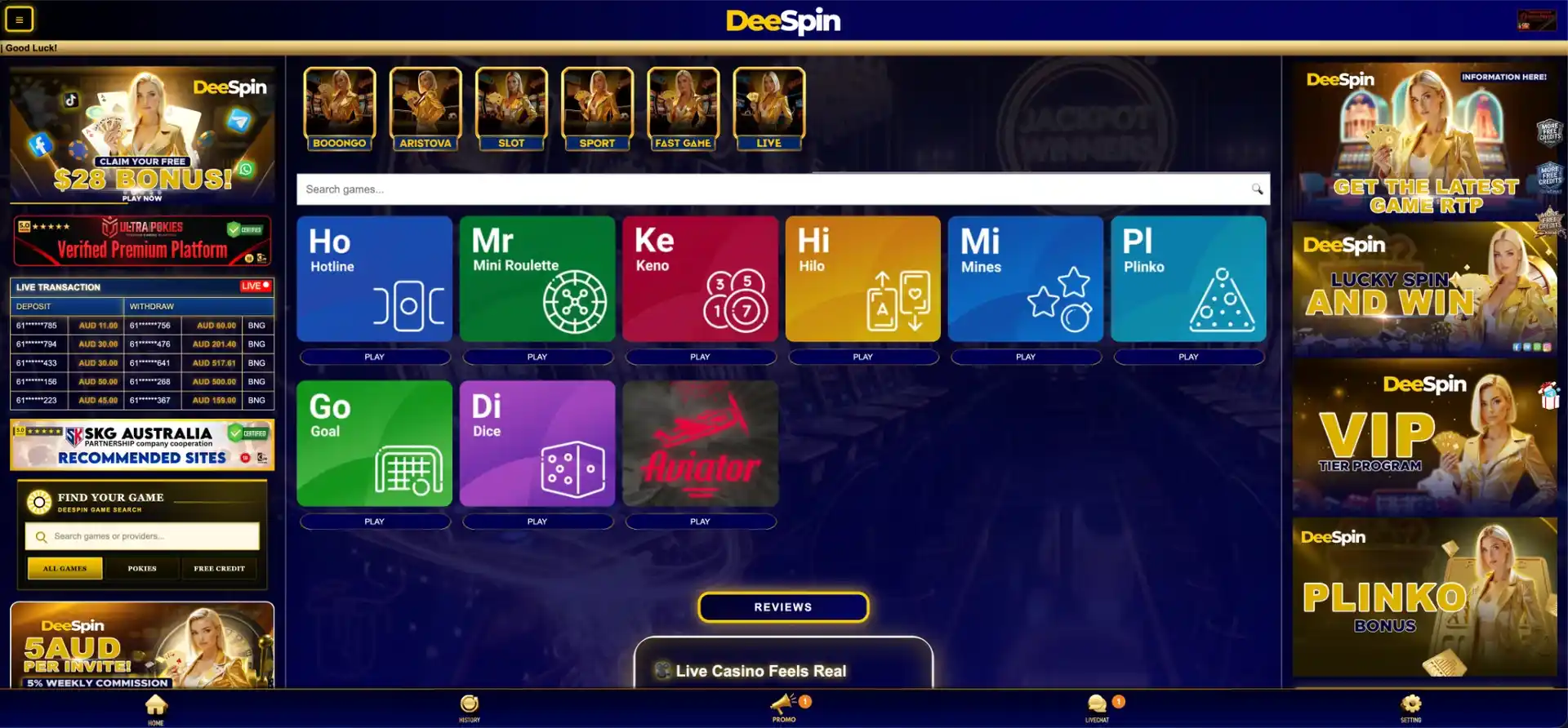
Features available in the Deespin app
Everything on the desktop site is available on mobile:
- Pokies: Booongo, Aristova, JILI and Gamzix titles, including Hold and Win games such as 3 Thunder Coins, 4 Clover Pots and Coin Strike XXL.
- Fast Games: Aviator, Plinko, Mines, Dice, Hilo, Keno, Goal, Hotline and Mini Roulette.
- Live casino: Big Gaming, Sexy Baccarat, Iconic21 and other studios.
- Sport: sports betting on the same AUD balance.
- Promo: free credits, Booongo daily free spins, rebates, red packets and VIP bonuses.
- Account: balance, Deposit, Withdrawal, History, VIP Lounge, referral tools and Livechat.
Mobile performance and data
Pokies load from their providers, so speed depends mostly on the connection. Hold and Win titles from Booongo and similar studios are light and start quickly, while live dealer streams use the most data. Wi-Fi is the better choice for long live casino sessions, while short pokies and Fast Game rounds work well on 4G or 5G.
Mobile payments and withdrawals in AUD
The cashier works the same way in the app. Deposits and withdrawals use Australian bank accounts in the player's name.
| Direction | Method | Minimum |
|---|---|---|
| Deposit | PayID / bank transfer | AUD 10 |
| Withdrawal | Australian bank account | AUD 30 |
On a phone, a PayID transfer can be sent from the banking app in a few taps and the receipt saved straight away, which makes it easy to show the payment to live chat if a deposit needs checking.
Bonuses in the Deespin app
All promotions are available in the app through the Promo button. The most useful ones on mobile are those that can be claimed quickly every day:
- AUD 28 New Member Free Gift Bonus after registration.
- Booongo daily free spins: 10 to 50 spins at AUD 0.20.
- Daily Check In Bonus and Daily Red Packets from AUD 4.88 to AUD 58.88.
- Daily First Deposit 20% and Sunday Unlimited Bonus 30%.
- 0.8% daily rollover rebate and 5% weekly win/loss cashback.
Usage tips for Australian players
A few habits make the Deespin app more practical:
- Download only from deespin com and keep the app updated.
- Claim free credits and free spins before starting play with a deposit.
- Keep deposit receipts from your banking app for every transfer.
- Use Wi-Fi for live casino streams.
- Set a weekly budget before chasing daily and weekly achievement rewards.
FAQ about the Deespin app
Common questions about installing and using the Deespin app.
Where can I download the Deespin app?
From the Download App banner on deespin com, which links to App Store and Google Play.
Is the Deespin app free?
Yes, the app is free to install.
Can I play Deespin without the app?
Yes. The mobile site in Safari or Chrome has the same games, bonuses and cashier, and can be added to the home screen.
Does the Deespin app use the same account?
Yes. The app and website share one account, balance and login.
Are bonuses the same in the Deespin app?
Yes. The Promo section in the app lists the same offers as the website.
Is an APK from another site safe?
No. Only download through the banner on deespin com; files from other sites are not provided by the casino.